
/ iOS app

A tabla book
that keeps time.

Tabla Mridang Sagar is a notation and practice book for iPhone and iPad. Write compositions matra by matra, practise them against the taal, print them, and keep the whole book on your own device.

Tabla Mridang Sagar app icon
/ Education · Version 1.0

Tabla Mridang Sagar

A local-first tabla notation and practice book. No account, no sign-in, no cloud — your compositions live on your device.

  • iPhone & iPad
  • iOS 17.0 or later
  • One-time purchase
  • No subscriptions
  • English
Coming to the App Store Tell me when it launches →

Published by Shiromani Designs Ltd. Pricing, availability and the App Store listing are managed through Apple.

/ What it is

A practice book, not a player.

Most tabla material lives in paper diaries, photographs of a teacher's notebook, or a notes app that knows nothing about taal. This keeps the notation, the cycle and the sound in one place.

  • 01Searchable composition book
  • 02Notation editor with cycles, matras and markers
  • 03Taal-aware metronome with a focus mode
  • 04Bol keyboard with Gurmukhi, English, manual and numeric entry
  • 05Custom taals, categories and bol keyboard entries
  • 06Local voice notes for a composition
  • 07Printable PDF composition sheets
  • 08JSON backup, export and restore
/ Inside the app

Thousands of compositions. One book.

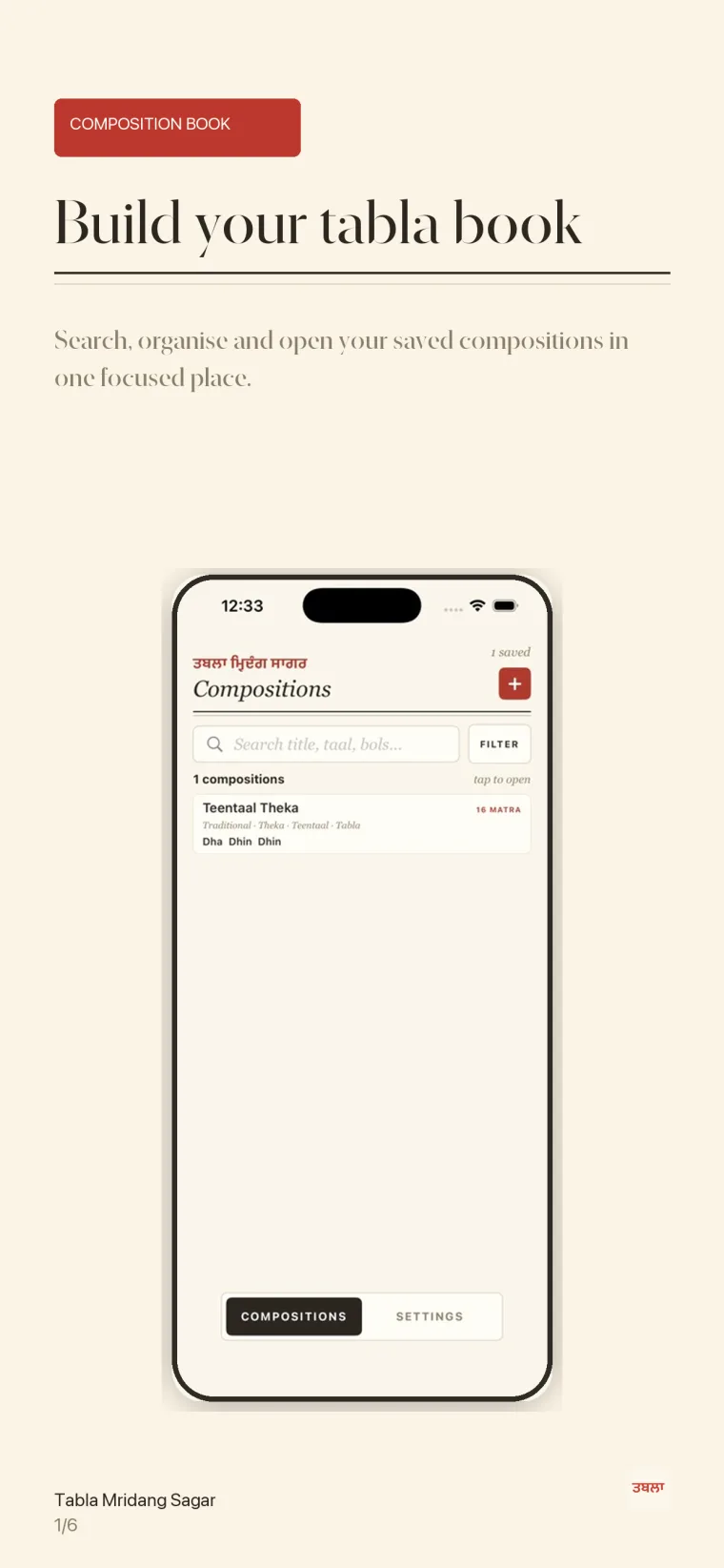
Composition book screen listing saved compositions with a search field and filter button.
01 / Composition bookSearch title, taal, category or bols
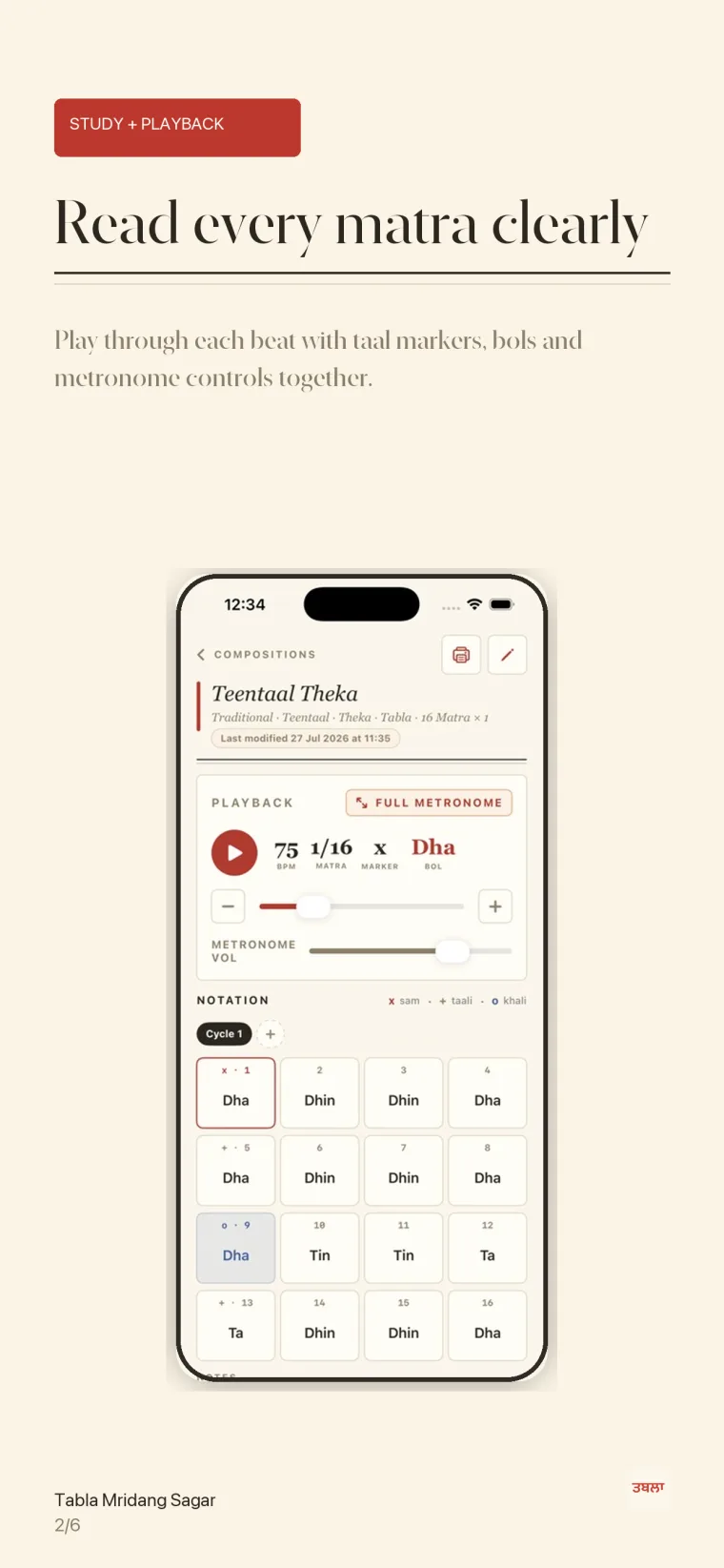
Composition detail screen showing playback controls above a sixteen-matra Teentaal notation grid.
02 / Study and playbackMarkers, beats and bols together
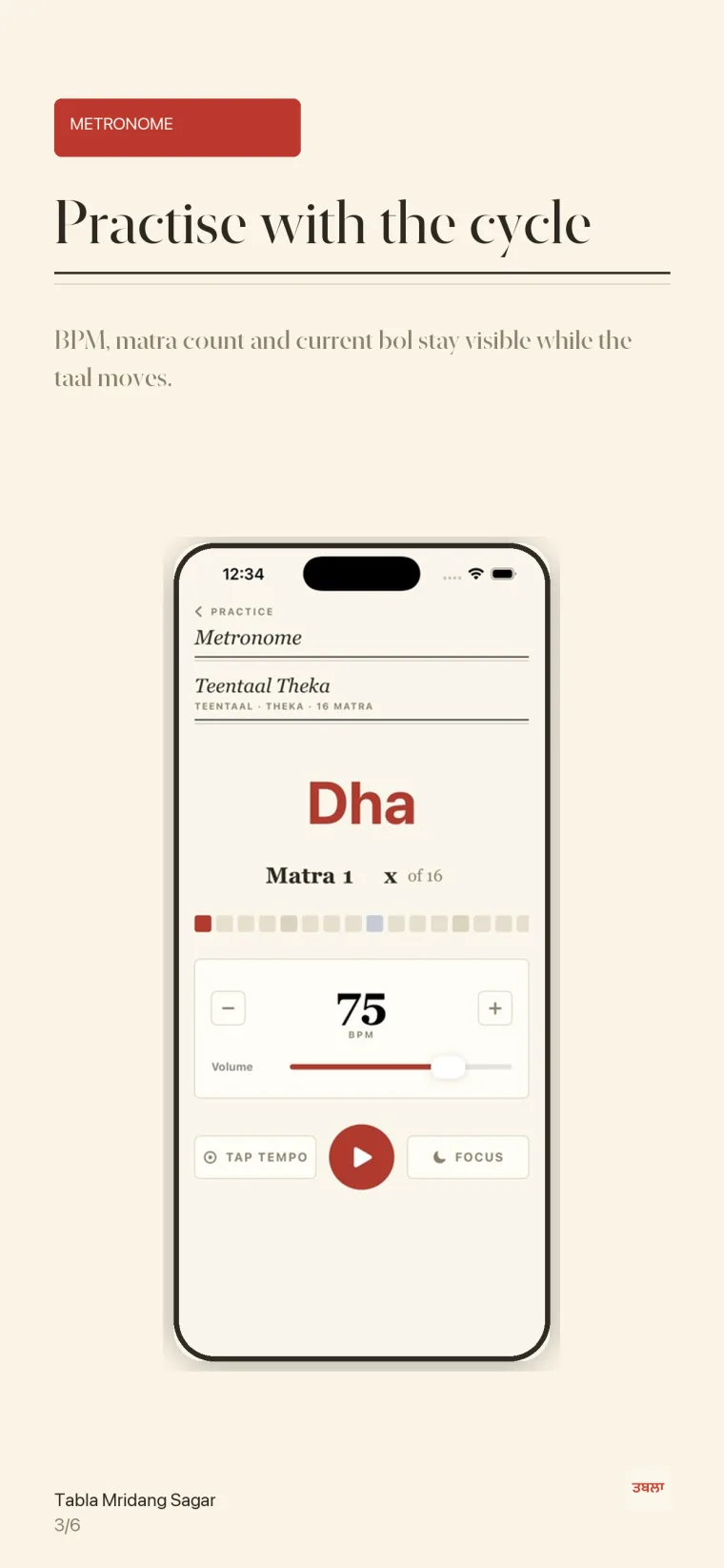
Full metronome screen showing the current bol, matra count, BPM, volume, tap tempo and focus mode.
03 / MetronomeBPM, tap tempo and the current matra
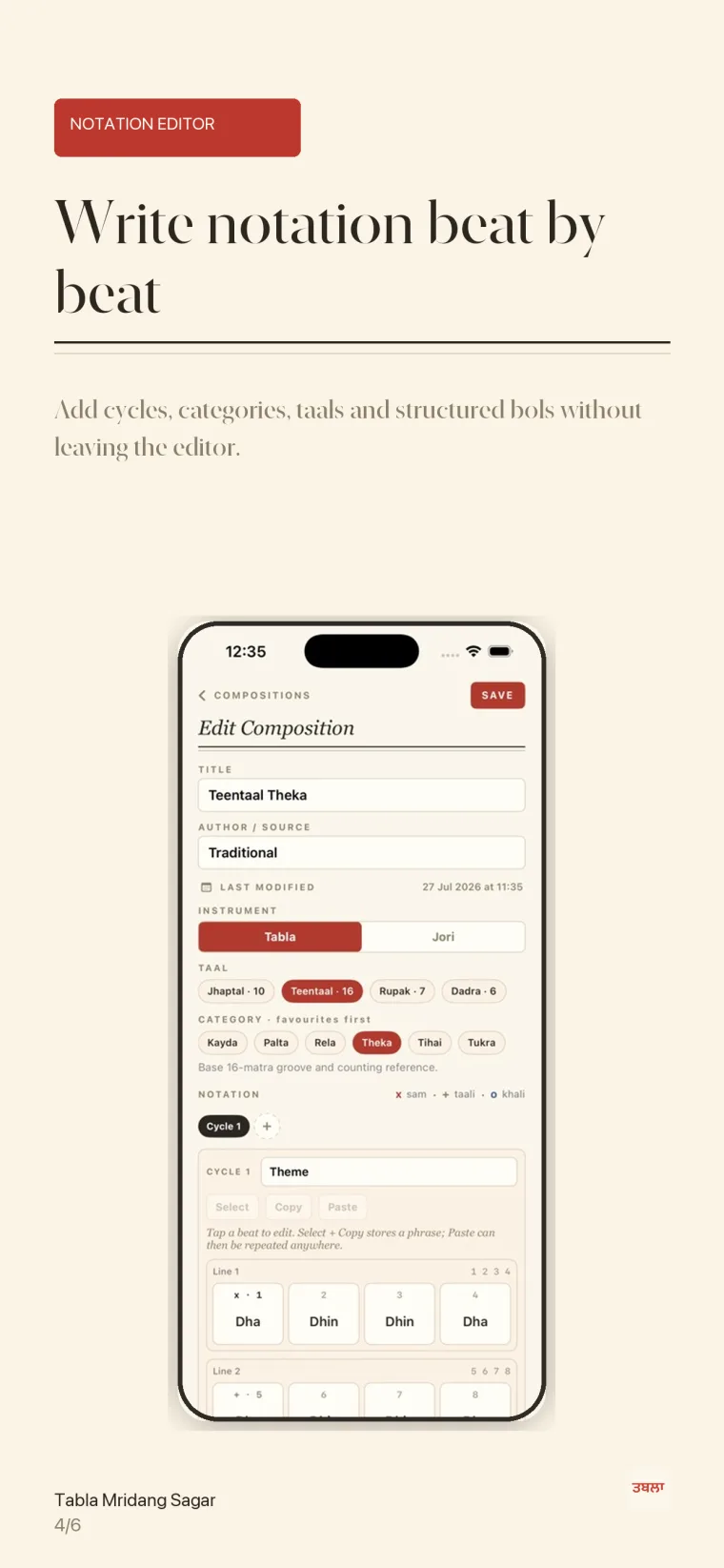
Edit composition screen with title, author, instrument, taal and category fields above the notation grid.
04 / Notation editorCycles, categories, taals and bols
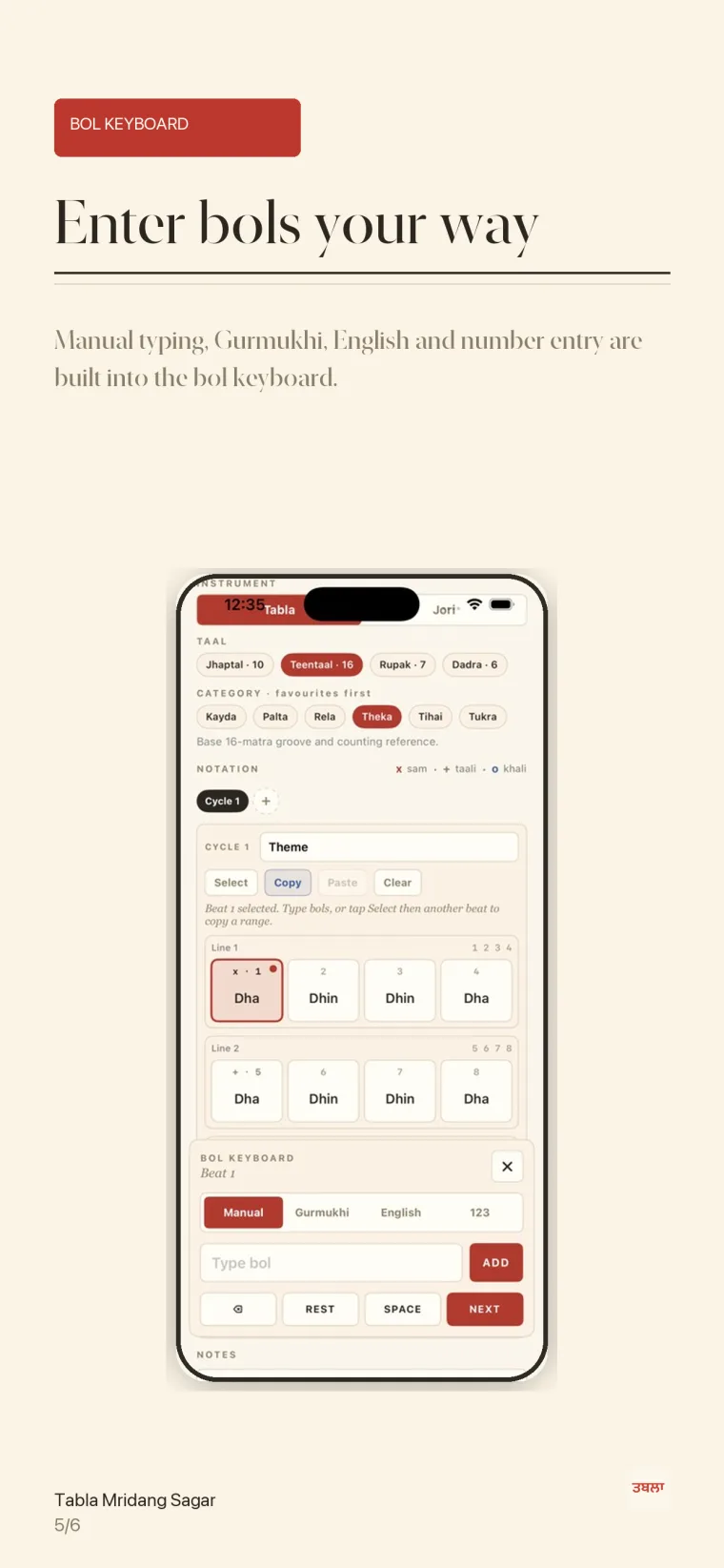
Bol keyboard open beneath the notation grid with manual, Gurmukhi, English and numeric entry modes.
05 / Bol keyboardManual, Gurmukhi, English and 123
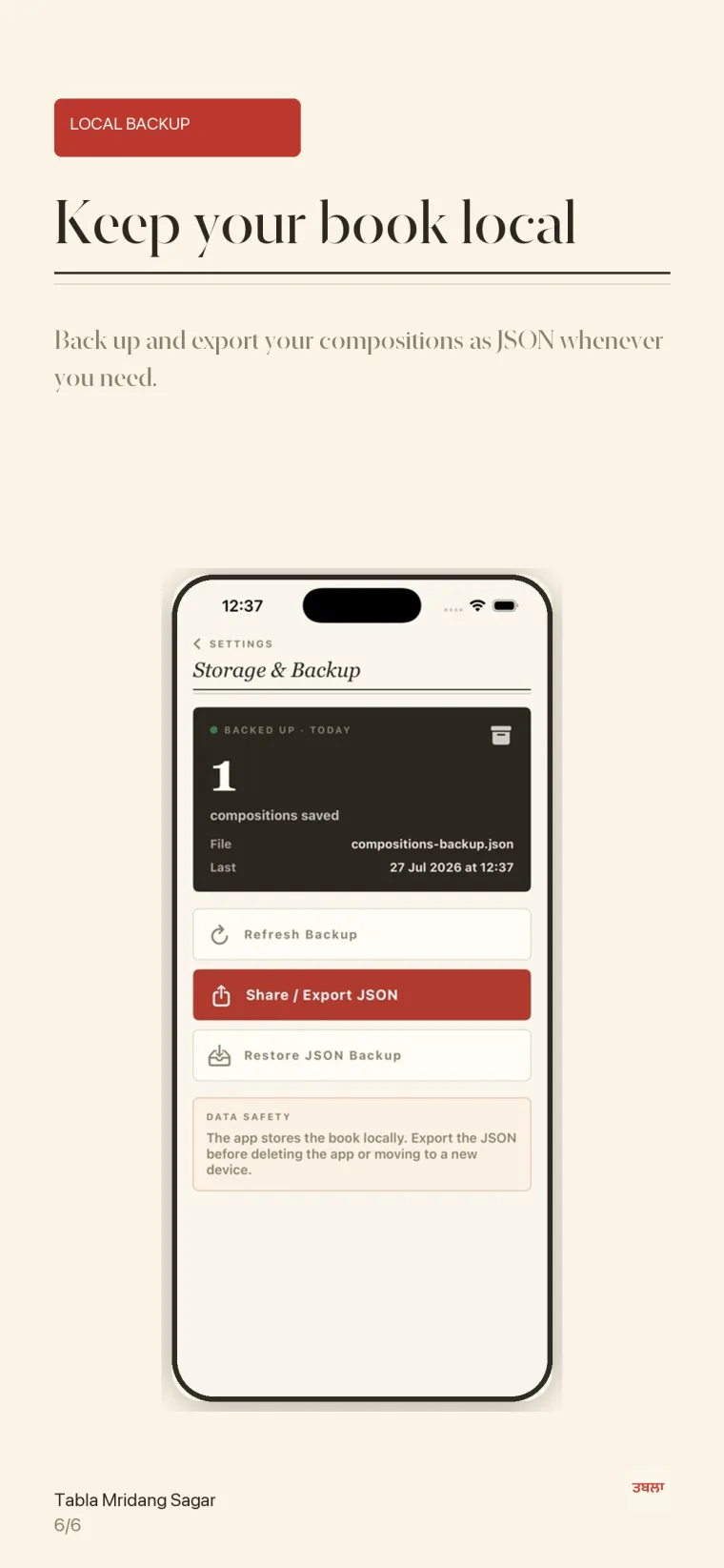
Storage and backup screen showing the local backup file, refresh, share and restore options.
06 / Local backupExport and restore your book as JSON

Scroll for more screens →

/ In detail

Built around the taal.

01 / Organise

The composition book

Every composition carries a title, author or source, instrument, taal, category, cycle count and written notes. Search and filter across all of it, so a kayda from three years ago is one query away rather than three notebooks away.

Includes: search · filters · instrument · favourites
02 / Write

Notation editor

Write beat by beat across cycles and lines, with sam, taali and khali marked where they belong. Select a phrase, copy it and paste it anywhere in the composition instead of retyping a repeated pattern.

Includes: cycles · matra markers · select · copy · paste
03 / Practise

Taal-aware metronome

Playback follows the taal rather than a plain click. The current matra, marker and bol stay visible as the cycle moves, with BPM, tap tempo and volume to hand — and a focus mode when the screen should show nothing else.

Includes: BPM · tap tempo · volume · focus mode
04 / Enter

Bol keyboard

Bols are not ordinary text, so they get their own keyboard. Type manually, or work in Gurmukhi, English or numeric entry, with rest and space where a beat needs to breathe. Add your own entries for the vocabulary you actually use.

Includes: manual · Gurmukhi · English · 123 · custom bols
05 / Adapt

Your taals and categories

Add a taal with its own matra count, vibhag pattern and sam, taali and khali positions. Keep categories — kayda, palta, rela, theka, tihai, tukra — arranged per taal, with favourites first.

Includes: custom taals · vibhag pattern · categories
06 / Keep

Print and back up

Export a clean PDF sheet for the wall, the lesson or the file. Back the whole book up as a JSON file you hold yourself, and restore it on a new device without an account or a cloud service in between.

Includes: PDF sheets · JSON export · restore · voice notes
/ How it fits practice

Write. Practise. Print. Keep.

01

Write

Capture what came out of the lesson while it is still fresh — bols, markers, cycles and a note on how it should feel.

In the notation editor
02

Practise

Run it against the taal at a tempo you can hold, then move the BPM up as the phrase settles.

In the metronome
03

Print

Export a PDF sheet when it needs to leave the phone — for a student, a class or a folder.

Through the share sheet
04

Keep

Export the book as JSON so years of work survive a new phone, a reset or a mistake.

In storage and backup
/ Privacy

Your book stays yours.

There is no account, no sign-in and no cloud sync. Compositions, taals, categories, bols, notes and voice notes are stored on your device.

Nothing is collected by us. The app has no analytics and no tracking, and it does not share your data with third parties. The microphone is used only while you are recording a voice note for a composition.

PDFs and JSON backups leave the app only when you send them yourself through the iOS share sheet.

Read the privacy policy →
/ At a glance

The details.

Name
Tabla Mridang Sagar
Version
1.0
Category
Education
Devices
iPhone and iPad
Requires
iOS 17.0 or later
Price
One-time purchase. No subscriptions and no in-app purchases. The App Store shows the price in your local currency.
Language
English, with Gurmukhi bol entry
Data
Stored on device. No account, no tracking, no data collected by the developer.
Publisher
Shiromani Designs Ltd, United Kingdom
/ Common questions

Before you download.

Do I need an account or an internet connection?

No. The app works offline and there is nothing to sign in to. Your book is written to your device and stays there unless you export it yourself.

What is in the app when I first open it?

One standard Teentaal theka, so the notation format is visible straight away. Everything after that is yours to write.

Can I add taals that are not in the app?

Yes. Add a taal with its own matra count, vibhag pattern and sam, taali and khali positions, then use it like any other. The metronome follows whatever you define.

How do I move my book to a new phone?

Export the JSON backup from Storage & Backup, move the file across however you prefer, then use Restore JSON Backup on the new device. There are step-by-step notes on the support page.

Why does it ask for the microphone?

Only to record a voice note against a composition, and only while you are recording. Voice notes stay on the device with the rest of the book. If you never record one, you can decline the permission and everything else works.

Is this a course or a lehra player?

No. Version 1 is deliberately a notation and practice book: write, practise, print and back up. It will keep improving around how students and teachers actually use it.

/ Questions about the app

We answer our own email.

Go to support ↗